Think about the last time you sat down for a movie night. You’ve got your popcorn, maybe some pizza, and the whole family is gathered on the couch. The remote control starts with Dad, moves to the kids to find their favorite YouTube channel, and eventually ends up tucked between the couch cushions. It’s the most handled object in the living room, yet it’s often the most neglected during a cleaning session.
At The Cleaning Ninjas Inc, we see it all the time. People scrub their floors, polish their windows, and sanitize their countertops, but that little plastic clicker stays sticky and germ-ridden for months. Today, we’re diving into the "Ninja Tips" for remote control sanitizing. Let’s face it, your remote is likely the biggest germ hub in your home.
The Science of the Smudge: Why Remotes are Gross
It sounds like an exaggeration to say a remote is dirtier than a toilet seat, but various microbiology studies have backed this up. Think about the "high-touch" surfaces in your home. Door handles, light switches, and faucets get a lot of love, but the remote is unique. We touch it while we eat, while we’re sick, and while we’re lounging.
Research has shown that remote controls can host significantly more bacteria than many other household items. They are magnets for:
- Skin cells: Millions of tiny flakes we shed daily.
- Food residue: Oils from chips, sugar from soda, and crumbs.
- Viruses: Cold and flu viruses can live on hard plastic surfaces for anywhere from several hours to several days.
- Staph and E. coli: These can easily be transferred from hands to the remote.
Because remotes have so many crevices, all those little buttons provide perfect hiding spots, it’s a playground for microscopic invaders. That’s why a quick "once-over" with a dusty rag isn't enough. You need a Ninja-level sanitization strategy.
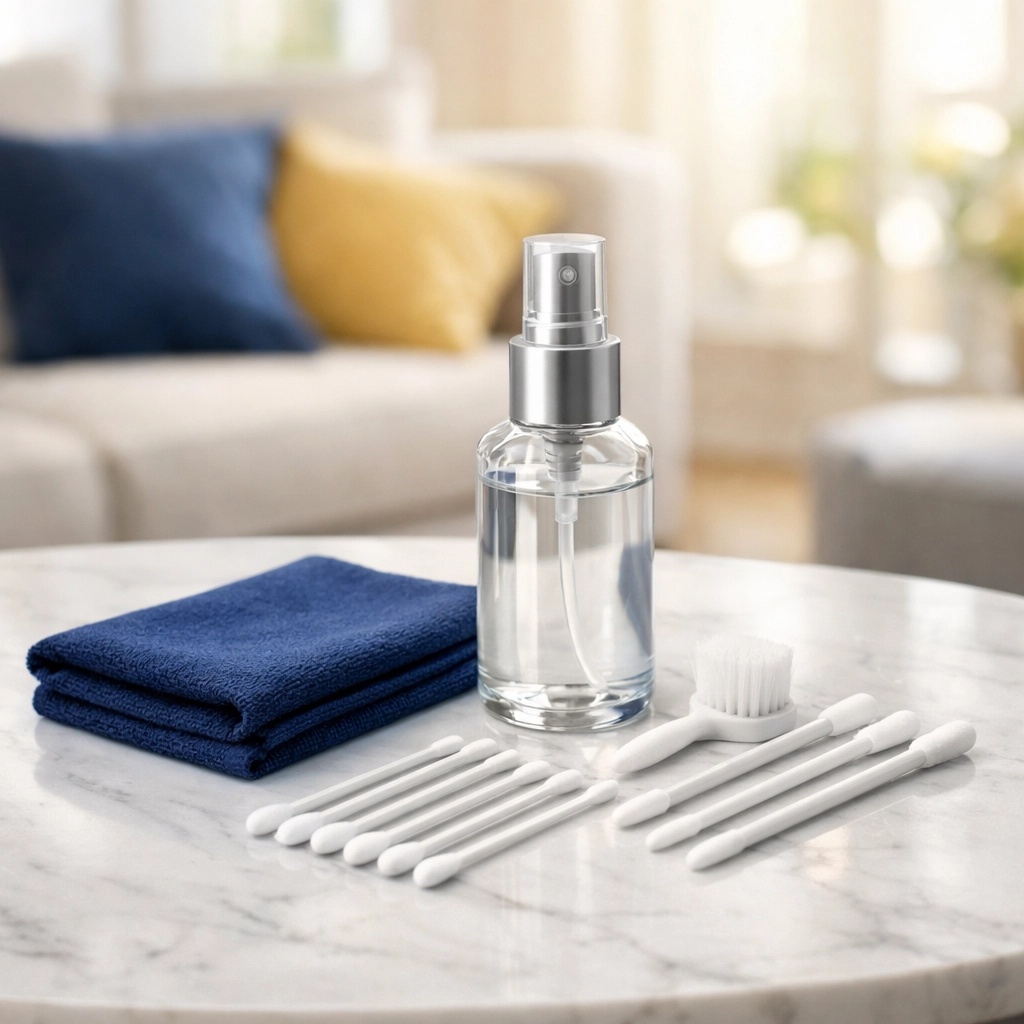
Your Ninja Sanitizing Kit
Before we jump into the "how-to," you need the right tools. We don't want to damage the electronics, so putting your remote in the dishwasher (yes, some people have tried!) is a definite no-go.
Here is what you’ll need:
- 70% Isopropyl Alcohol: This is the gold standard. It kills 99.9% of germs and evaporates quickly, which is essential for electronics.
- Microfiber Cloths: These are lint-free and won’t scratch the plastic or the infrared sensor.
- Cotton Swabs (Q-tips): Perfect for getting into the tight spaces between buttons.
- Toothpicks or a Soft Toothbrush: For digging out that stubborn "mystery gunk" that accumulates in the seams.
- Lint-free wipes or EPA-approved disinfecting wipes: If you're in a hurry, these are great, provided they aren't dripping wet.
The Step-by-Step Ninja Method
Cleaning a remote requires a delicate touch. You want to be thorough without being destructive. Follow these steps to ensure a germ-free binge-watching experience.
Step 1: Power Down (Remove the Batteries)
This is the most important step. Before you apply any liquid: even just a damp cloth: take the batteries out. This prevents any short circuits if a tiny bit of moisture seeps inside. It also allows you to clean the battery compartment and the battery cover itself, which often hides a surprising amount of dust.
Step 2: The "Dry" Shake and Brush
Turn the remote upside down over a trash can and give it a few gentle taps. You might be surprised to see crumbs and hair fall out. Take a dry, soft toothbrush and run it over the buttons to loosen any debris. This initial step makes the wet cleaning much more effective.
Step 3: The Microfiber Wipe
Dampen your microfiber cloth with the 70% isopropyl alcohol. Pro Tip: Never spray the alcohol directly onto the remote. Liquids can easily seep under the buttons and corrode the circuit board. Instead, spray the cloth until it’s damp, then wipe down the entire surface of the remote: front, back, and sides. Pay extra attention to the areas where people grip the device.
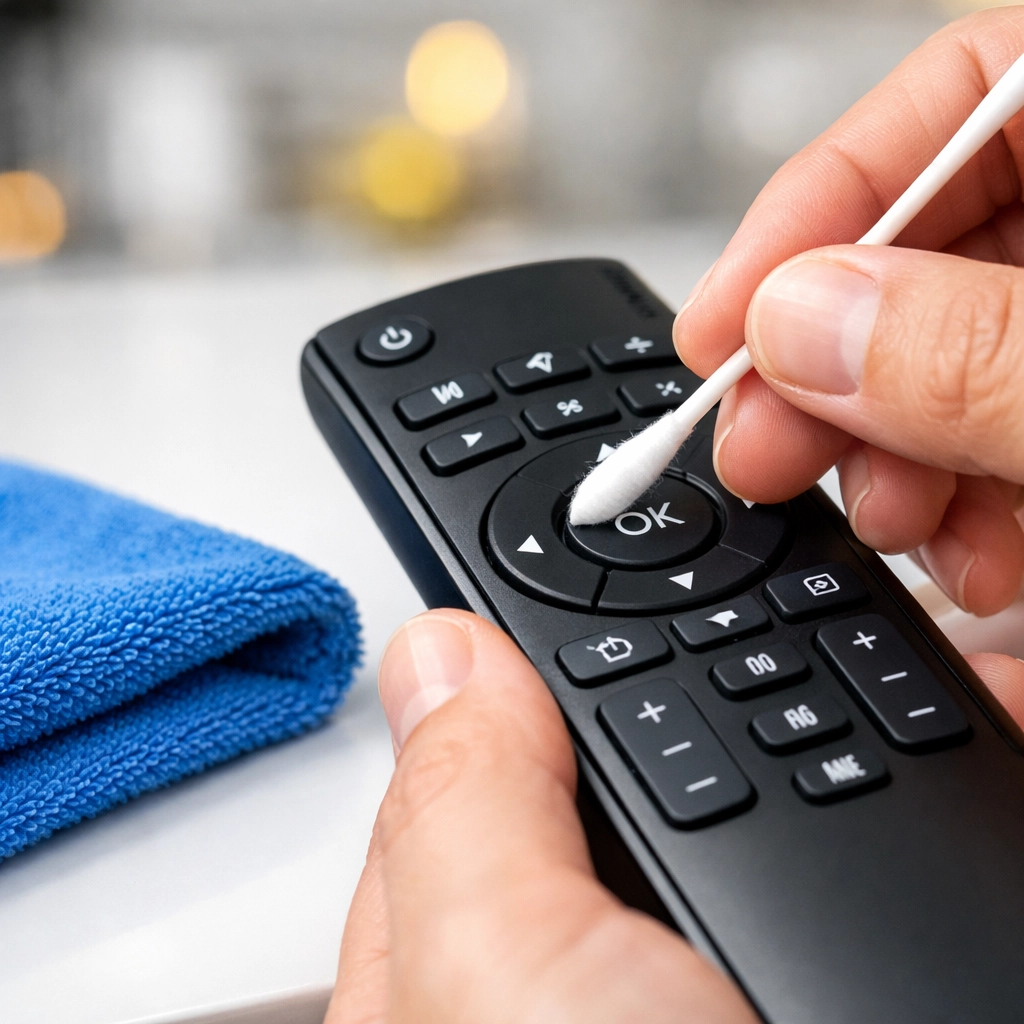
Step 4: Detail Work with Cotton Swabs
This is where the real "Ninja" work happens. Dip a cotton swab into the alcohol. Squeeze off any excess so it's not dripping. Carefully run the swab around the base of every single button. This is where oils from fingers collect and create that sticky, dark residue. If you find gunk trapped in the tiny seam where the two halves of the remote shell meet, use a toothpick to gently scrape it out.
Step 5: Don’t Forget the Sensor
The front of the remote has an infrared (IR) window. If this gets oily or dirty, your TV might not respond as well to your commands. Use a clean part of your microfiber cloth to give that sensor a gentle polish.
Step 6: The Battery Cover and Compartment
Wipe down the inside and outside of the battery cover. If you see any white, crusty residue inside the battery compartment (battery acid leakage), you can use a cotton swab with a tiny bit of white vinegar to neutralize it, followed by alcohol to clean it. Make sure it's 100% dry before moving to the next step.
Step 7: Air Dry and Reassemble
Let the remote sit for at least five to ten minutes. Even though alcohol evaporates fast, you want to be sure the internal edges are bone-dry. Once dry, pop the batteries back in, and you’re ready for the next episode of your favorite show!
Beyond the TV: Other Remotes in Your Hub
While we usually focus on the TV remote, your home is likely full of other handheld "germ hubs." To keep your home truly clean, you should apply this Ninja technique to:
- Gaming Controllers: These take a beating. Between sweaty palms and intense gaming sessions, Xbox, PlayStation, and Nintendo controllers are often the filthiest items in a teenager's room.
- Air Conditioning Remotes: These often sit unused for months, collecting dust and then getting handled frequently during the summer.
- Ceiling Fan Remotes: Usually mounted on a wall or sitting on a nightstand, these are frequently touched but rarely cleaned.
- Smart Home Hubs/Tablets: If you have a dedicated tablet for controlling your lights and music, it needs a sanitizing wipe-down daily.
If you find that keeping up with all these little details is becoming a chore, you can always check out our services to see how we can help keep your entire home: remotes and all: in tip-top shape.
How Often Should You Sanitize?
The frequency of cleaning depends on your household.
- Standard Household: Once a week is a great habit. It prevents the buildup of "the gunk" and keeps germs at bay.
- Flu/Cold Season: If someone in the house is sick, you should sanitize the remotes daily. Viruses spread fast in shared spaces, and the remote is a primary delivery vehicle.
- Homes with Toddlers: If you have little ones who like to put things in their mouths (including the remote), you might want to wipe it down every evening.

Prevention: Keep the Grime Away
If you want to spend less time cleaning, you can implement a few "prevention" rules:
- The "No-Food" Rule: Try to keep snacking separate from channel surfing. If you must eat while watching, wash your hands or use a napkin before grabbing the remote.
- Hand Sanitizer on the Coffee Table: Keep a small bottle of sanitizer nearby. A quick squirt before picking up the remote goes a long way.
- Silicone Covers: You can buy inexpensive silicone "sleeves" for most remotes. These are much easier to wipe down and can even be removed and washed in warm soapy water (just the cover, not the remote!).
Why Cleanliness Matters to The Cleaning Ninjas Inc
At The Cleaning Ninjas Inc, we believe a clean home is a happy, healthy home. We’ve built our reputation on paying attention to the details that others miss. Whether it's the top of a ceiling fan or the buttons on your remote, we know that a true deep clean involves every surface. You can learn more about us and our philosophy on creating pristine living environments.
Keeping your remote controls sanitized is a small task that makes a huge impact on your family's health. It’s a quick win in the battle against household germs. So, the next time you’re tidying up the living room, don’t just straighten the pillows: grab your alcohol and a cloth and give that remote the Ninja treatment!
For more great advice on keeping your home sparkling, head over to our blog where we share our best secrets every week. Happy cleaning!